
Real Life System Design: Scaling Facebook Live Videos to a Billion Users
Facebook scale live video

Scale (as per the talk in 2017): 1.23 billion people access Facebook each day.
Topics covered
High Level Architecture
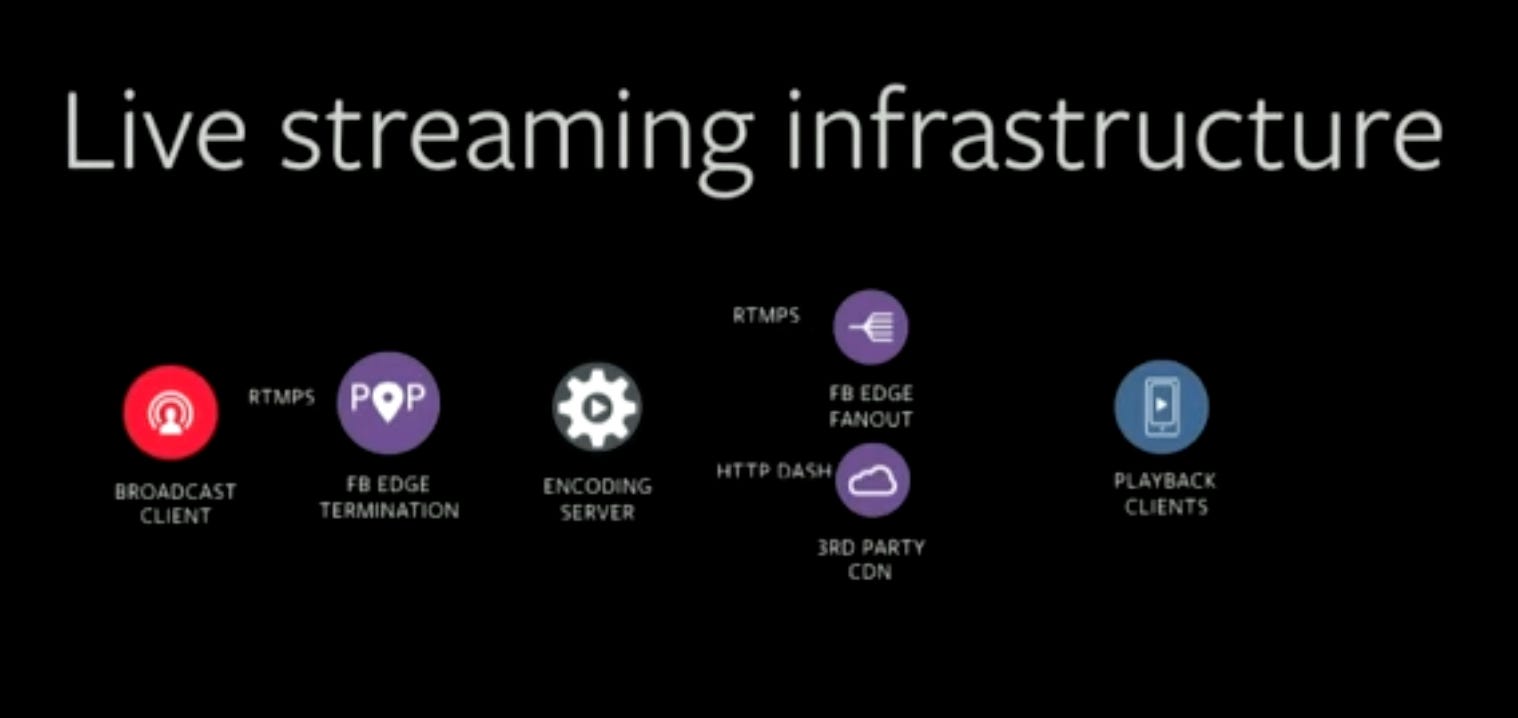
Broadcast Client: The client who wants to start a live stream.
POP: The client (mobile) connects to the nearest PoP (Point of Presence) using RTMPS: Real Time Messaging Protocol as Secure. PoP is a rack of Facebook hosts.
Encoding Server: The PoP then forwards the connection to a datacenter where encoding can happen. Different bitrate, different resolutions are created for a given stream here.
FB Edge Fanout: After transcoding, the stream is then forwarded to a different PoP where Playback clients are connected. The clients may be all over the world. The whole pipeline of transferring the data has very low latency.
3rd Party CDN: These CDNs are use to reduce the network bandwidth required. Facebook also uses its own CDNs, but that’s not enough.
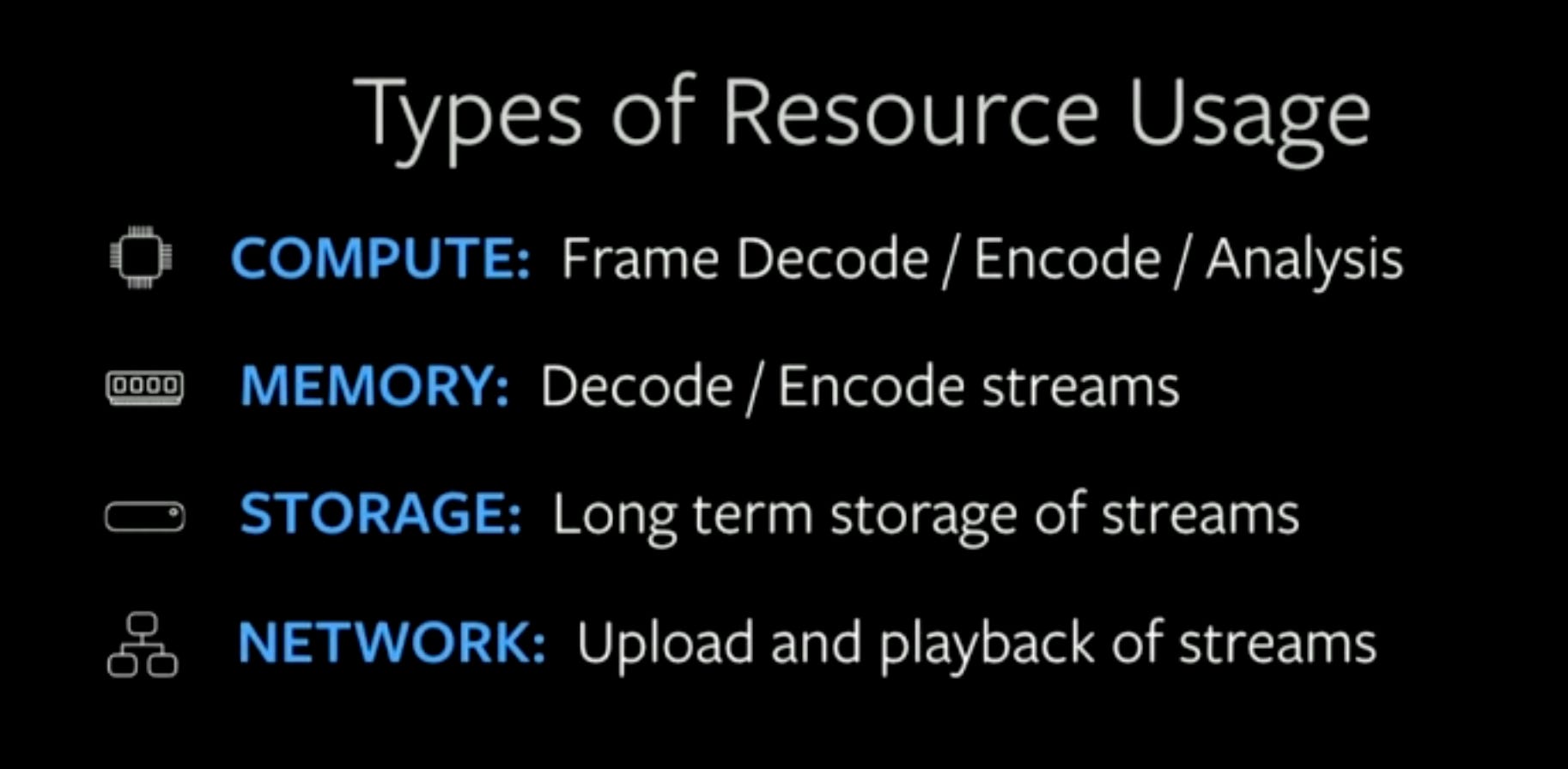
Compute (CPU) and Memory: More CPU and memory is required if the number of video streams are more.
Storage: If the user chooses to store the video for future as a regular video, it goes to the long term storage.
Network: The network required to upload the video is not significant, however, the network bandwidth required to play back the video is significant.
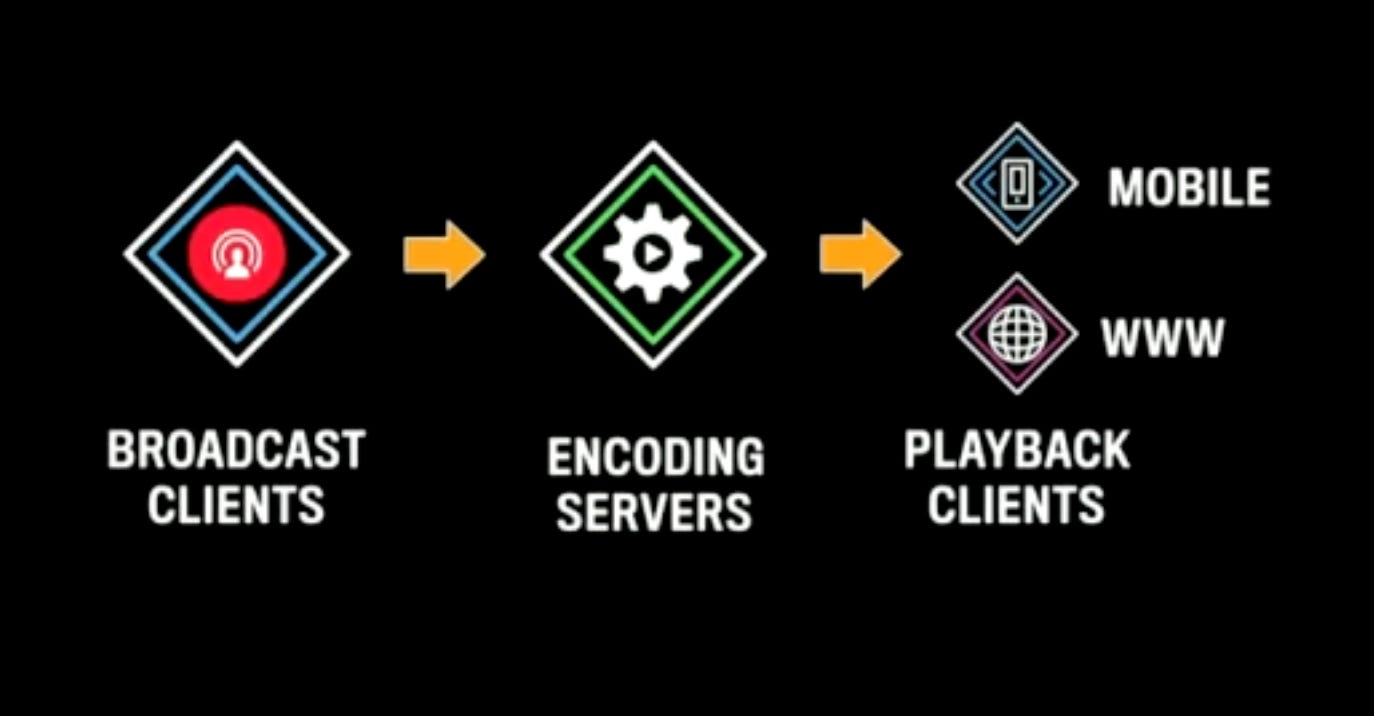
Simplified Architecture
Scaling Challenges
Challenge 1: No of Concurrent Unique Streams
There was a pattern of usage: during the day, there is a spike, at the evening / night time, the spike goes down.
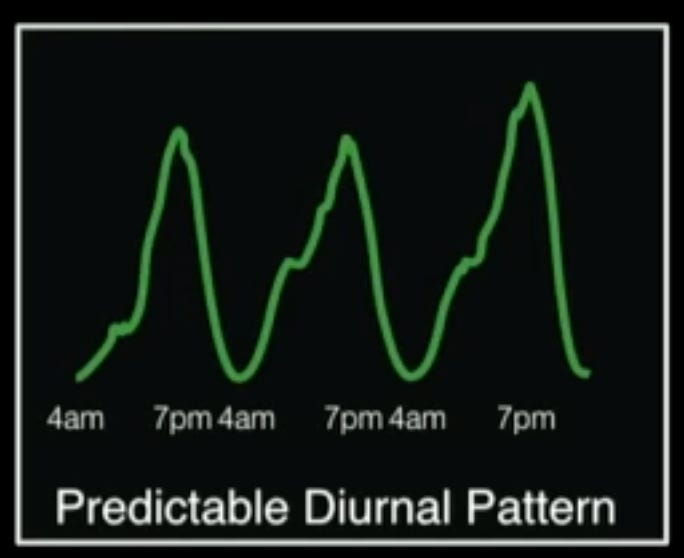
Since the pattern is predictable, resources can be planned accordingly.
Few decisions to make at this point:
Ingest Protocol: An ingest protocol to be chosen which would allow all the system to work across different network conditions like cellular network, wifi etc. It should be also something which takes advantage of Facebook’s network infrastructure - adapting to the existing infrastructure.
Network Capacity and Server side encoding resource: Network capacity and server side encoding capacity have to be planned for all these streams.
Challenge 2: Number of Viewers of All Streams
This also has reasonably predictable pattern.
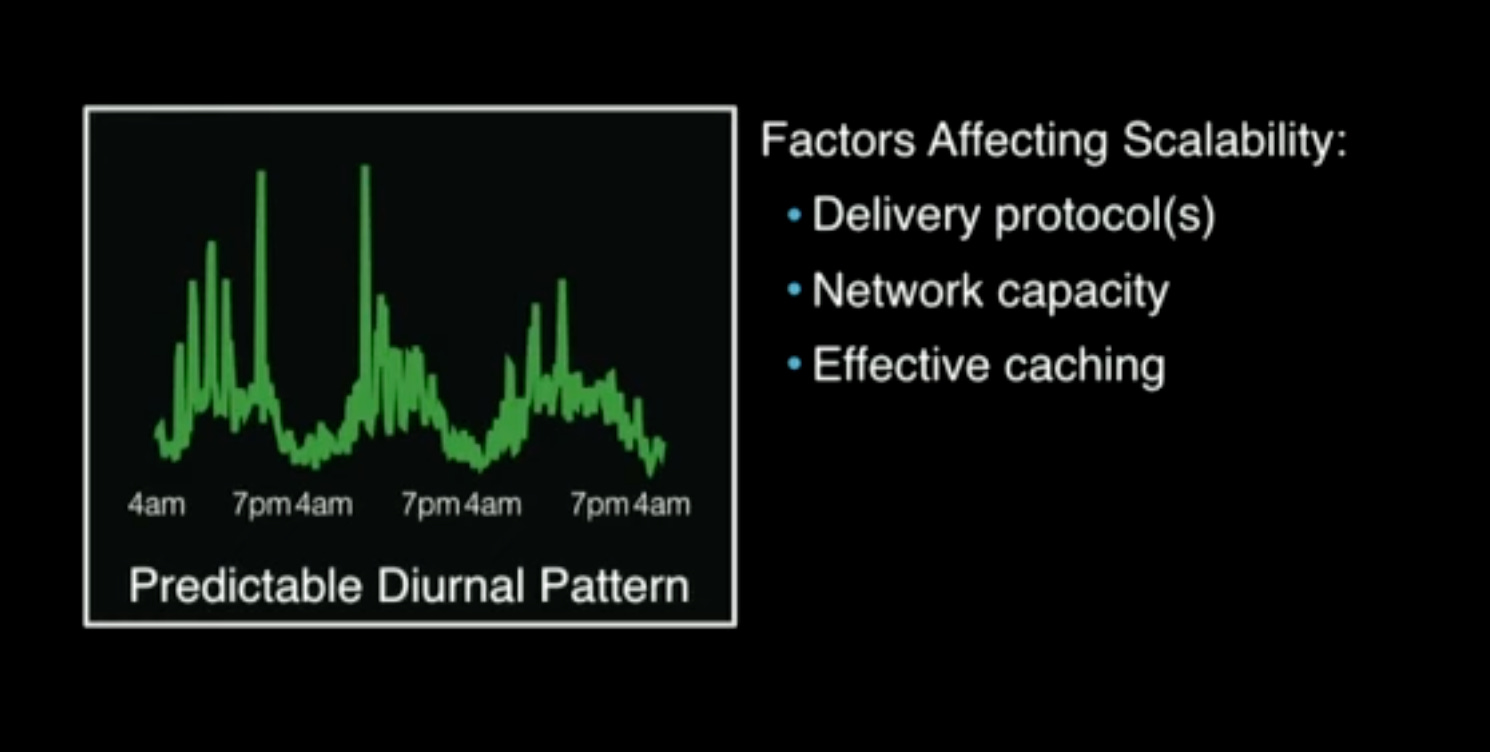
Delivery protocols: The delivery protocols should be chosen in such a way that they can take the advantage of Facebook’s networking infrastructure. The protocols can be different at the ingestion side and the delivery side.
Network capacity: Network requirement here is huge. CDNs plays a big part here.
Effective caching: Extremely important to scale the system.
Challenge 3: Maximum Number of Viewers of Single Stream
This is very unpredictable, hence it can not be planned. There is no way to know at what point some live stream will go viral and why.
Hence, they had to depend on Caching and Stream Distribution to solve it reasonably.
How Facebook Live Video is Different
This gives a sneak peak into unique problems in the world of live videos:
Populating cache ahead of time is tricky as these are live videos and they can’t be pre-cached like Netflix videos.
Predicting number of viewers of any stream is hard (Unlike scheduled live events) as there is no way to know which video becomes popular at what point.
Planning for live events and scaling resource ahead of time is problematic.
Predicting concurrent stream/viewer spikes caused by world events is difficult.
Protocols and Codes
The four most important requirements for broadcast protocols
Time to Production: They built the infra and scaled to a billion users in just eight months. So, they took advantage of everything - network infra, libraries etc.
Network Compatibility.
End-to-End Latency: The latency should be
sub 30 seconds, ideally in single digit seconds. With that goal, there can not be too many buffers in the pipeline - as more buffer means more latency in seconds.Application Size: Less than
500 KBwas the budget on application size as it has to be integrated with the Facebook app.
Options considered
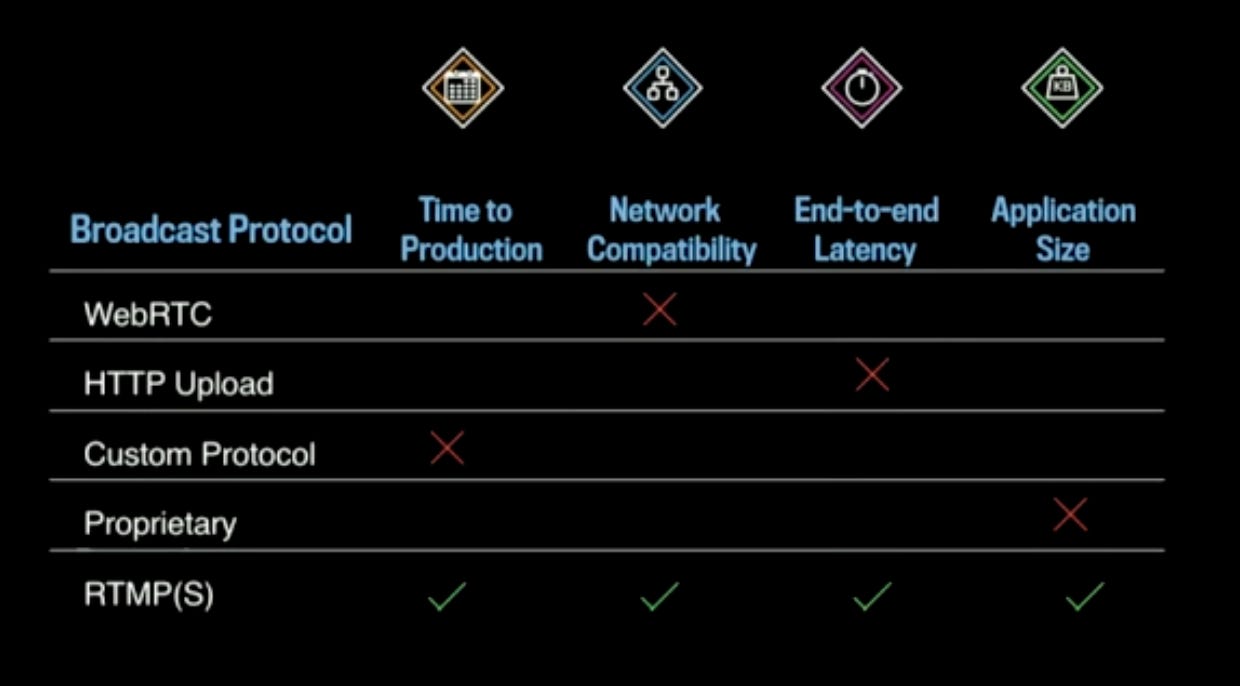
WebRTC: Works on top of UDP, but Facebook network infrastructure is tuned primarily for TCP.
HTTP Upload: Bad upload option in terms of End-to-End latency.
Custom Protocol: Estimated time to production was high.
Proprietary: Most of them were beyond the size of
500 KB.RTMPS(S): Ticks all the boxes:
It’s built for video streaming so it had the right latency characteristics.
It’s widely used in the industry, has client and server side library meaning time to production was reasonable.
Works over TCP, so compatible with Facebook network infra.
Library size was about
100 KB, well below the budget.
The Four Important Encoding Properties
Aspect Ratio:
1:1Resolution:
720 X 720for normal bandwidth. If a client has lower bandwidth, it can drop down to lower bit rate of400 X 400.Audio Codec:
AAC, 64 KBIT- industry standard.Video Codec:
H264, 500 KBIT and 1 MBIT- industry standard.
Stream Ingestion and Processing
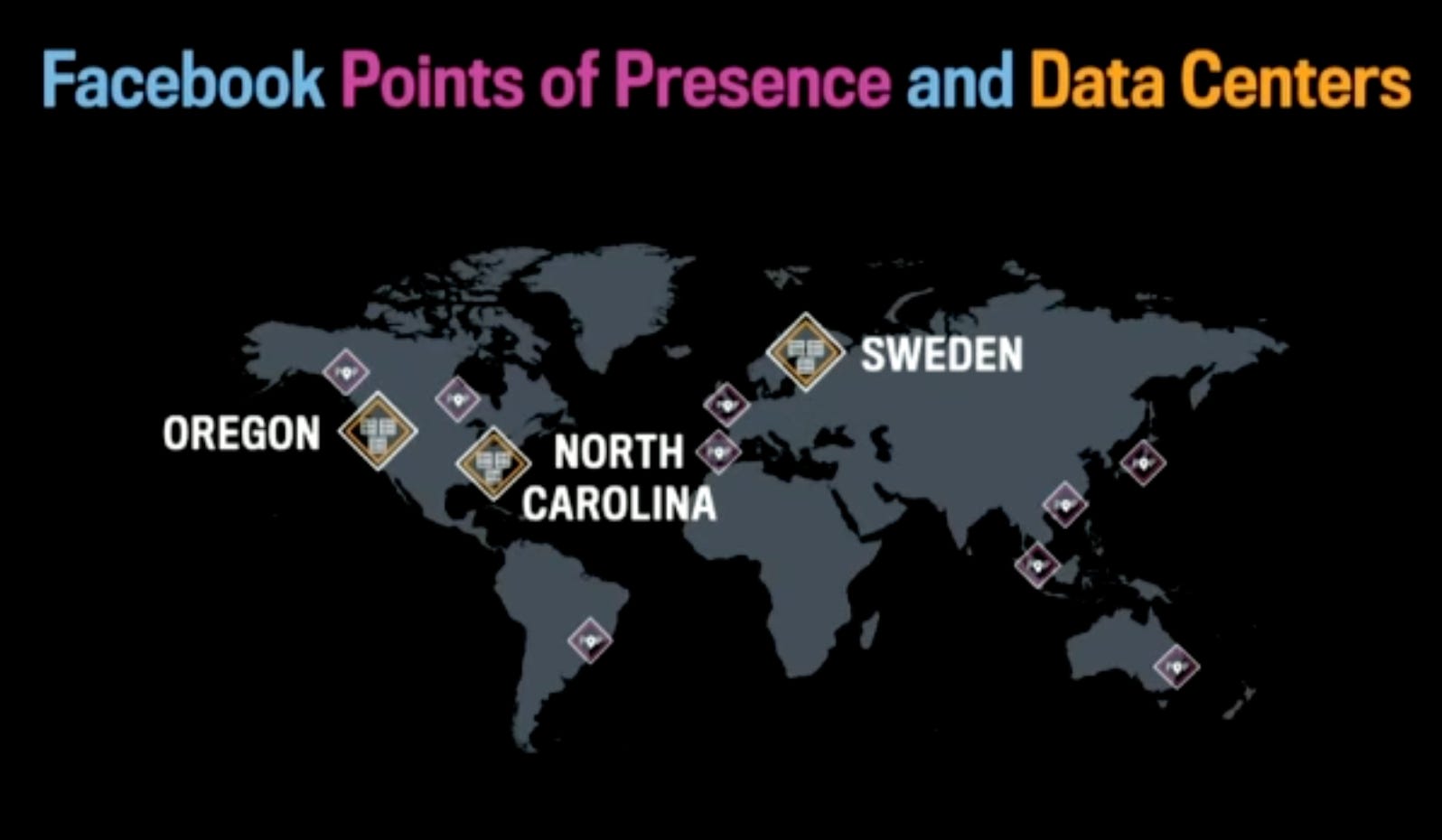
A PoP has a several racks of hosts which have 2 important responsibilities:
To terminate incoming client connections and pass these connections over Facebook’s network which is much more reliable. This way the round trip time is lower compared to people connecting from wherever they are to the datacenters.
PoPs can cache streams for the playback side, not on ingestion.
When somebody wants to start a live stream, they create a connection to a PoP. Before they create a connection, they call out of band API to get three things:
Stream Id - Required for consistent hashing.
Security Token - Required for authentication purpose.
URI - The URI gets resolved against Facebook’s network infra, it gets load balanced and the client knows which DC or which PoP to talk to. As soon as a connection to a PoP is made, the PoP will forward the connection to a DC.
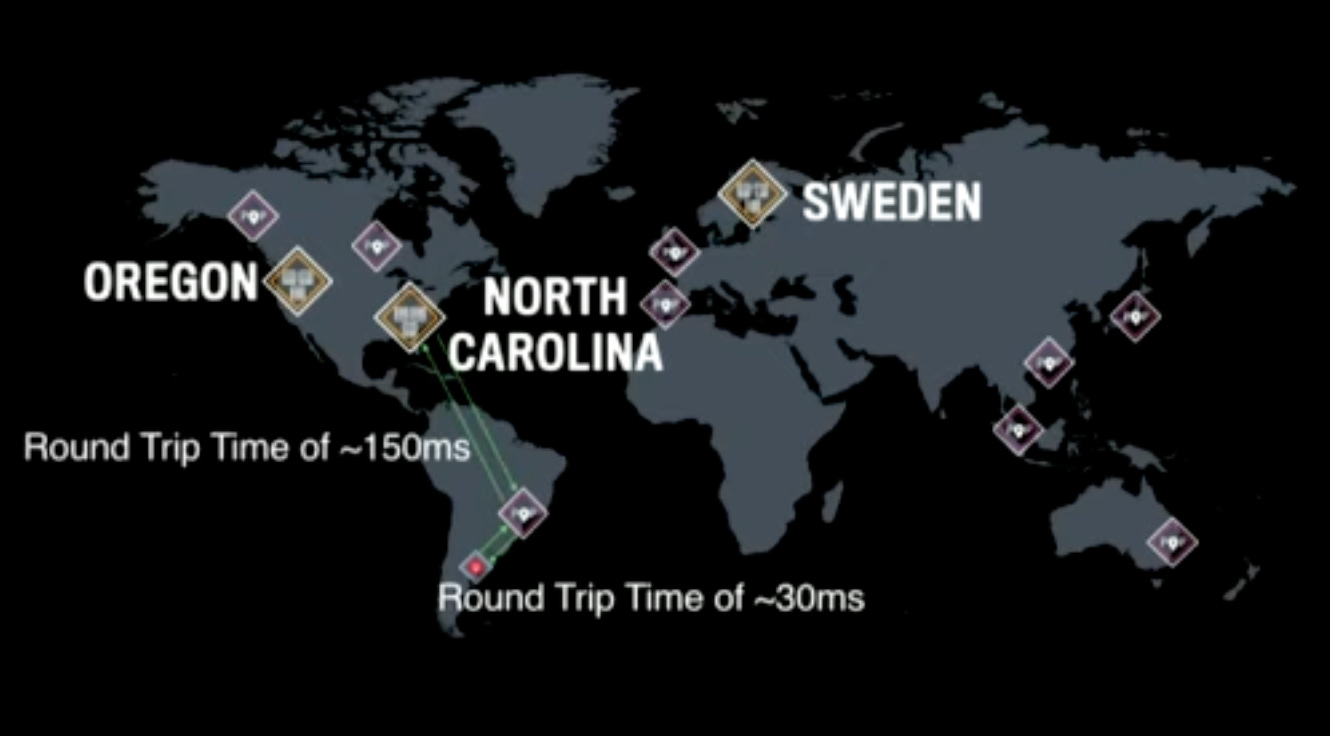
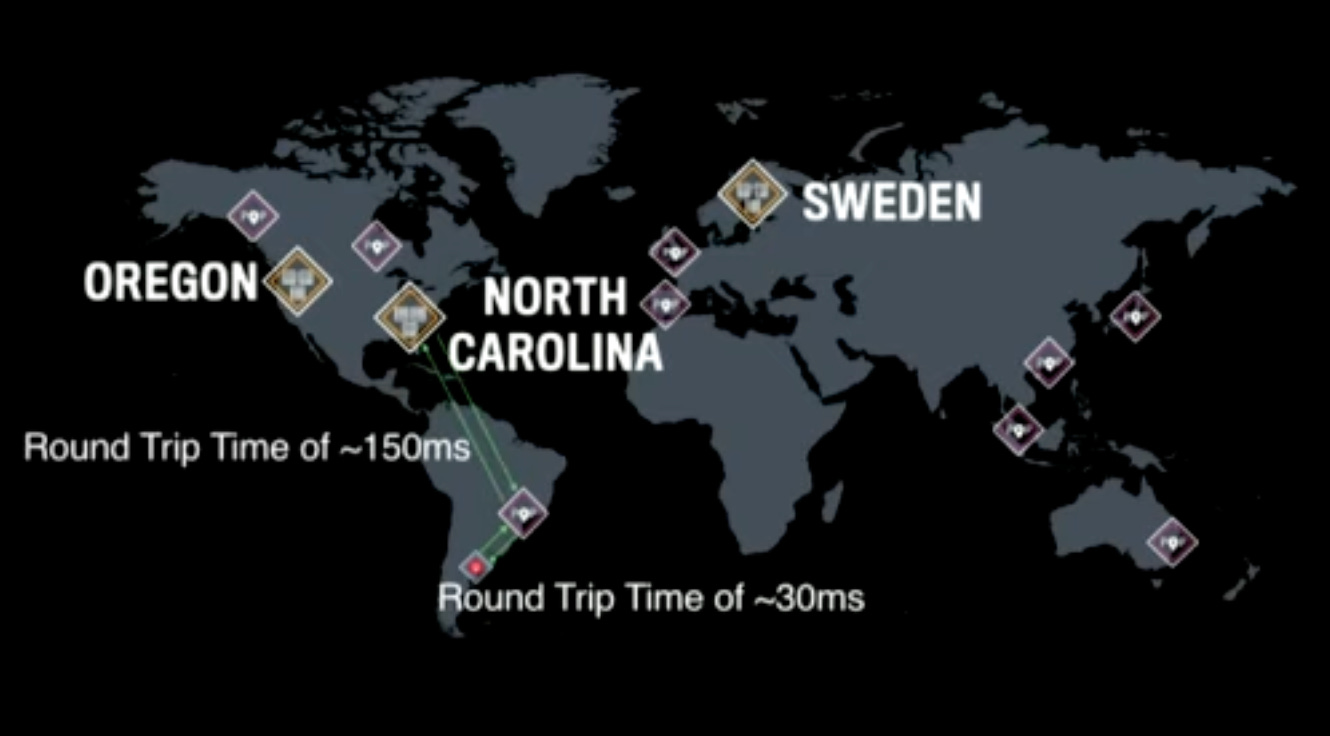
The Stream Id is used to map an incoming stream to a particular datacenter. As long as the system is balanced, it does not matter which specific DC is picked for a given stream. Once chosen, the stream keeps going to the same DC to reduce jitter and lag.
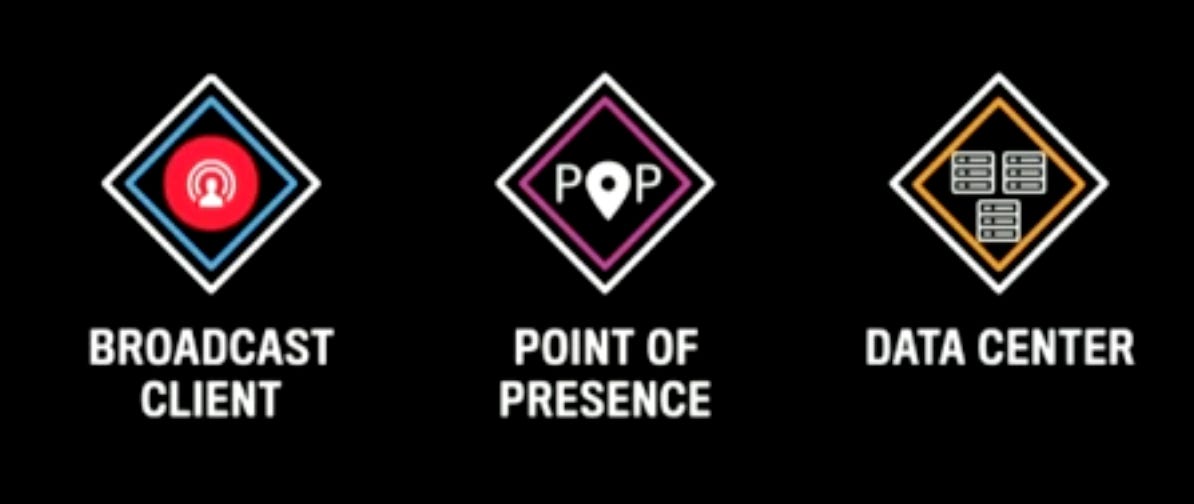
So, broadcast clients connect to a PoP and the PoP connects to a DC.
PoP
As discussed before, a PoP has 2 things:
Proxygen Hosts - where broadcast client connects based on the received URI as discussed above.
BigCache Hosts - Cache used to cache streams. However, on the ingestion side, such cache is irrelevant.
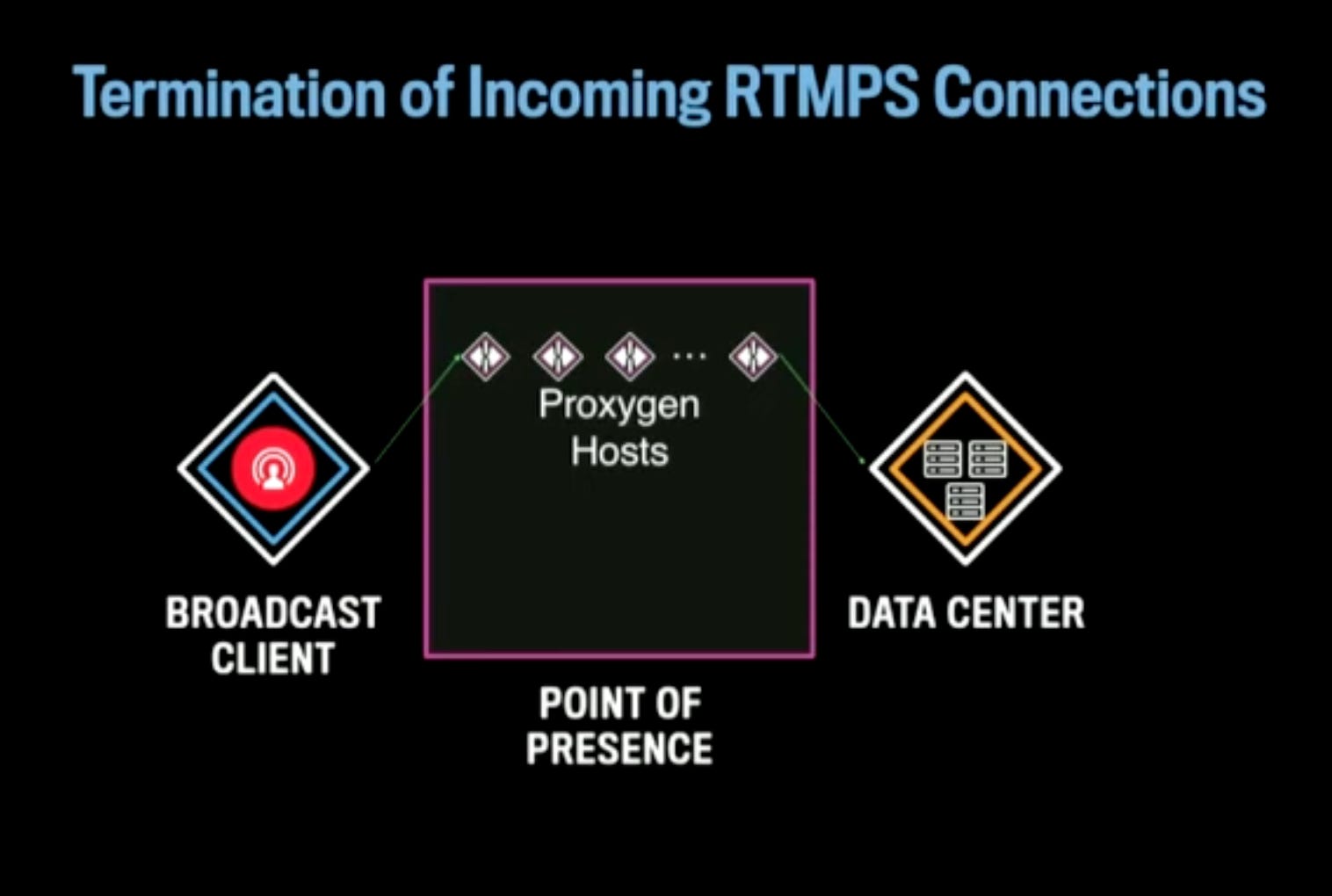
A broadcast client connect to a Proxygen host in a PoP closest to it. The Proxygen host has scriptable logic that determines what to do for an incoming stream or connection. For a live stream, it sends the live stream to an appropriate DC based on load balancing - the talk does not describe how a DC is chosen.
Data Center
A DC has three kind of hosts:
Proxygen hosts
BigCache hosts - irrelevant for ingestion
Encoding hosts - They are the owners of a given stream and a bunch of processing happens on those streams in these hosts.
The broadcast client creates a connection to nearest PoP. The PoP forwards the connection to a random Proxygen host in the DC. The DC Proxygen host performs a consistent hashing on the Stream Id and sends it to an appropriate encoding host within the DC.
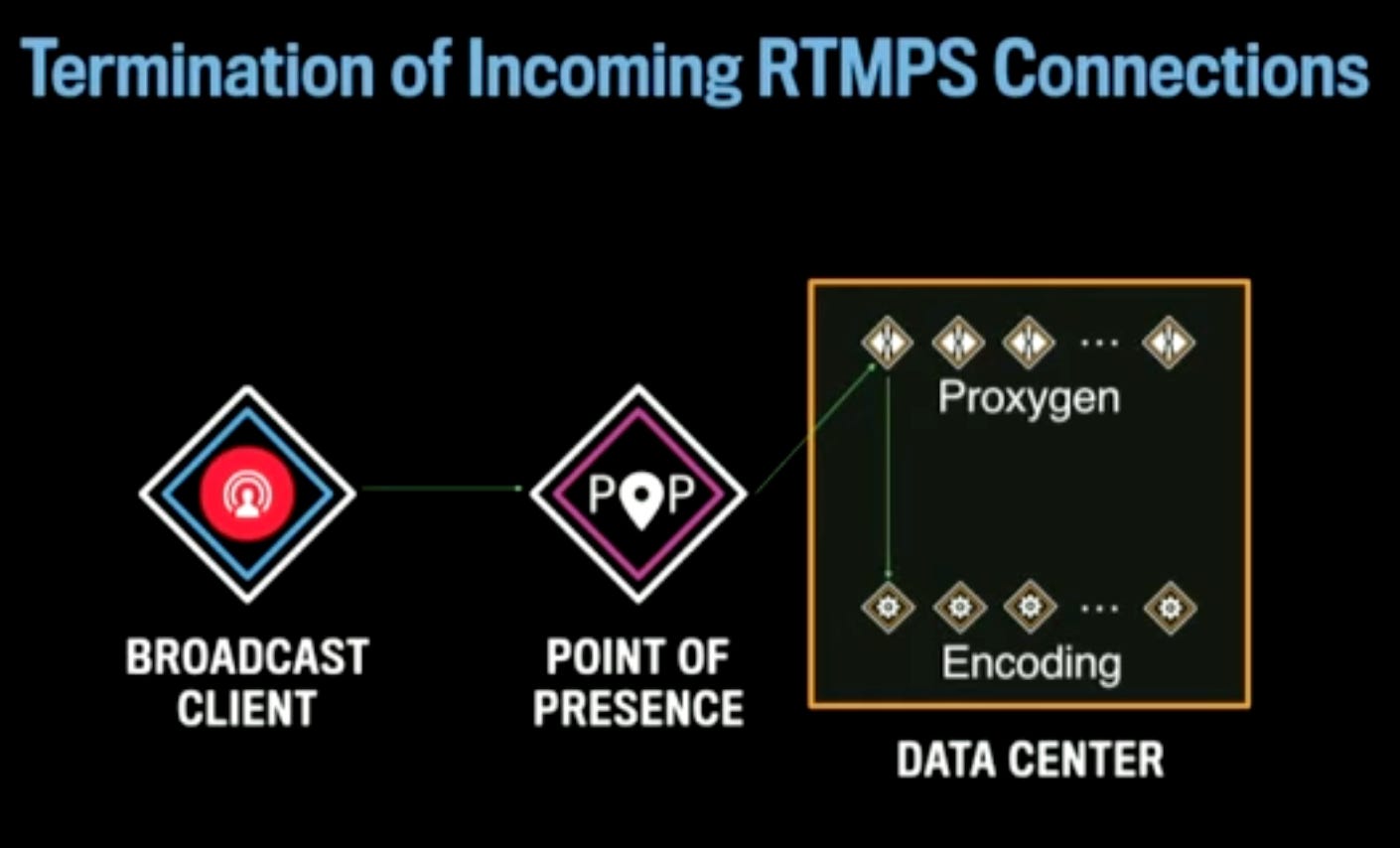
Initially they chose Source IP for mapping the streams to encoding hosts. But a lot of streams were mapping to a single machine and it did not work, hence, they moved to Stream Id and it worked much better.
Stream Id based mapping has a great significance - when a broadcast client moves to another network say from cell to wifi, they create a new connection to the PoP, but they still can use the same Stream Id. Thus, it helps to map the client stream to the same encoding host minimizing jitter. So, viewers of the stream virtually feel no impact when host gets disconnected and it connects back using the same Stream Id probably on a different network.
This logic also allows to deal with planned and unplanned outages which happen daily at Facebook scale. So what happens when an encoding host is lost?
The end-to-end connection from the broadcast client also breaks away when an encoding host is gone. The clients connect back to the nearest PoP which in turn connects to a random Proxygen host of the DC. The DC Proxygen host realizes that the previously mapped encoding host is no more, it uses consistent hashing to find the next encoding host who can handle the stream and it starts sending the data to that host. Depending on how long it took to identify the previous host is down, there could be a small jitter, but most of the clients won’t even realize this.
Role of Encoding Hosts
Authenticate stream: They make sure that the stream is proper, formatted correctly and so on.
Associate host with stream: They become the owner of the incoming streams which are mapped to them. This is important because when the playback clients connect to the PoP, the PoP need to know which hosts to fetch the data from. The encoding hosts are the ones who tie the ingestion side and the playback side together.
Generate Encodings: Encoding hosts create several encodings on the incoming stream - some low quality with lower bitrate to support clients watching using lower bandwidth network.
Generate playback output: They create the playback output which is DASH.
Media storage: The encoding servers store the live videos in long term storage.
Playback: HTTP Streaming (MPEG-DASH)
MPEG-DASH is a streaming protocol over HTTP.
It consists of two types of files - Manifests file and media files. Manifests file is a text file which points to media files.
Server creates 1 second segments, updates manifest. As a live stream is created, a segment is created each second and the manifest is updated to point to this new segment. As the stream goes on, the Manifest file keeps on increasing, so they keep a rolling time window. If a stream goes on for several hours, it’s not useful to send the entire Manifest file to all clients all the time because this is supposed to be a live video.
Client refreshes the Manifest file using
HTTP GET.Client retrieves media segments via
HTTP GET: When the client sees there are new segments, it fetches those corresponding segments via HTTP GET.
MPEG-DASH also allows different bit-rates for the same stream depending on the bandwidth and then syncing them appropriately.
DASH Playback
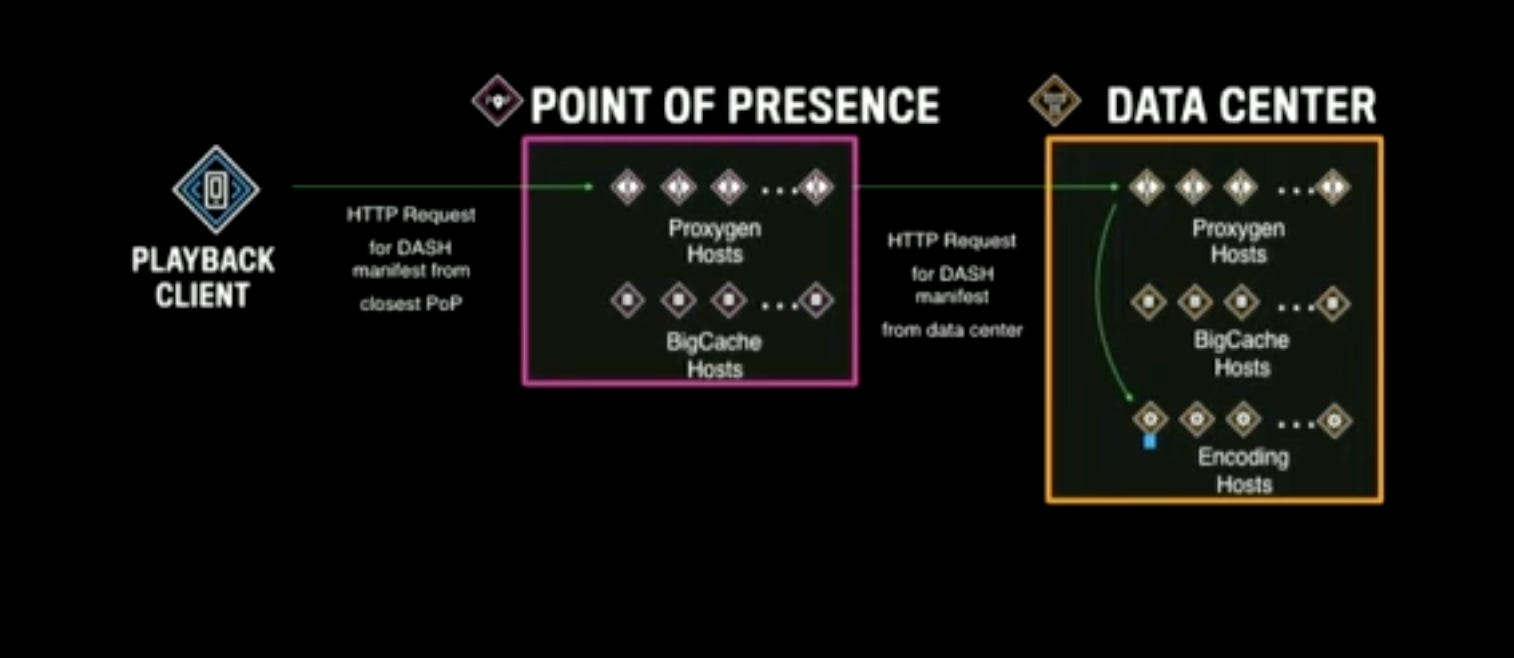
The playback client connects to the nearest PoP and asks for the Manifest file for the stream which the user has started watching from the feed.
Let’s assume this is the first time anyone has requested the Manifest file for a given stream. So the only places where it’s available is the encoding host.
The PoP Proxygen host checks in its local BigCache host if the file is available. There is noting yet.
The Proxygen host makes a call to DC that is supposed to be responsible for the stream and connects to a random Proxygen host there. The DC Proxygen checks in its BigCache host, the file is not yet there.
So, based on the consistently hashes
Stream Id, the DC Proxygen knows which encoding host to talk to for the Manifest file. It gets the file there.It then populates its own cache. Sends the response back to Proxygen in the PoP which in turn again populates its own cache and then sends the response back to the client.
Why so many cache population?
When another playback client connects to the same PoP, the PoP now finds the Manifest file in its BigCache. No need to hit the DC. So, for a stream with large number of viewers, a lot of viewers could connect to the same PoP and due to the virtue of the 2-Layer caching, it’s now easy to serve those requests - thus there is now a reasonable solution to the problem. So, scaling out both PoP and DC with their own separate cache architecture works well.
What happens if another user from another location tries to access the Manifest file for the same stream?
The client connects to their nearest PoP, the PoP does not have the file. The PoP goes through the same steps as above and when it hits the DC, the DC finds the file in its BigCache, it returns the response. The PoP caches the response and returns the response to the client.
So, roughly, the number of requests the DC will get for each Manifest file equals to the number of PoP.
Since the Manifest file is updated when the live video is in progress, how to update the file in the PoP servers?
One way to handle this is by setting a
TTLto the cached records. Once theTTLexpires, the next request would fetch the Manifest file again to the PoP.Another way is to use
HTTPpush to push the file periodically to the PoP servers. This approach is better than the first one but slightly complicated.
Reliability Challenges
Network problem at the Ingestion side
What happens if the broadcast client has bad network and disconnects from the platform? Nothing can be done there.
What if the connection is poor but it’s not disconnected yet? In that case, the app can apply adaptive bit-rate strategy to lower the quality of the video and upload it to the PoP. It’s better to have low quality of video than having no video streaming at all.
There are three ways to handle the network problems:
Adaptive upload bit-rate based on connectivity - as described above.
Handling temporary connectivity loss on broadcasts - it can be handled by buffering the streams at the client side.
Audio only broadcast and playback - in the worst case, where there is no bandwidth to send videos, audio-only broadcast can be done.
Thundering Herd
What happens when too many clients try to access the files at the same time in the same PoP and the PoP does not hold the requested files?
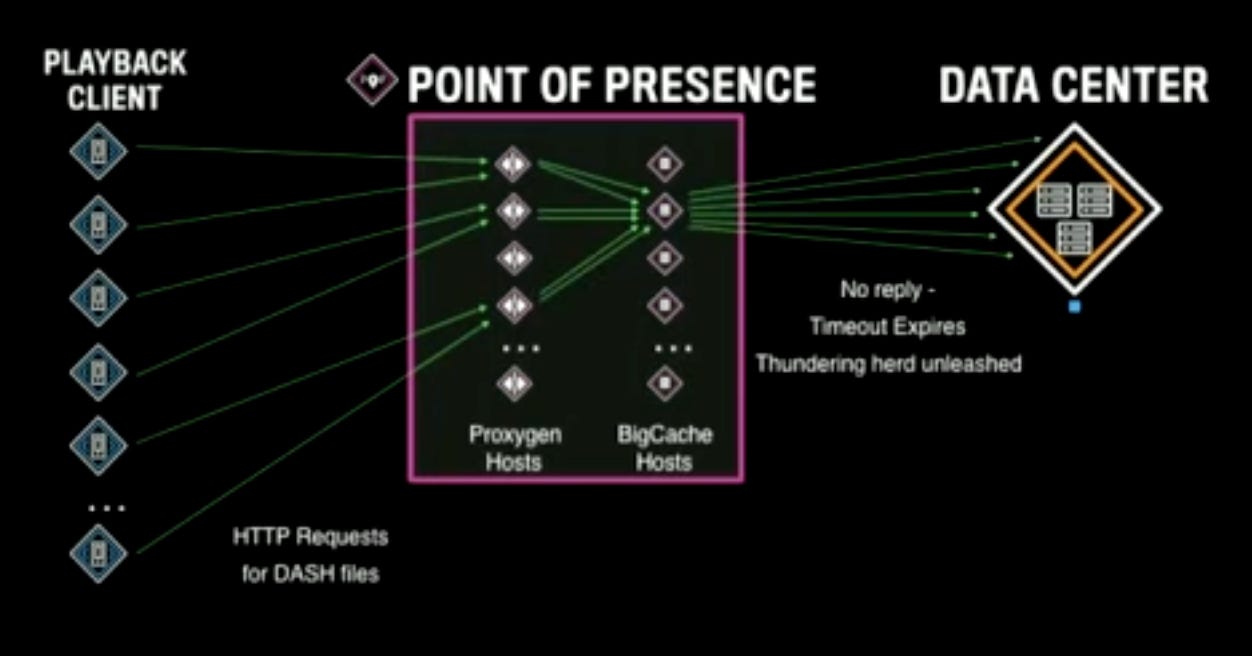
None of the requests won’t succeed and ideally they would all try to access the DC. But, here Facebook applies some optimization - instead of forwarding all the requests to the DC, they pass only one request to the DC and they apply a cache blocking timeout. All other requests wait till the cache blocking timeout, if no response arrives, they all go to the DC to fetch the file. This unleashes thundering herd. Thundering herd can kill the DC. To counter this, over the years, Facebook tuned the timeout to a reasonable value (not too high, not too low) so that they can reduce the possibility of such events.
Lessons Learned
Large services can grow from small beginnings: Sometimes it’s not possible to predict that something would become big. So, it’s better to write some code than keeping on discussing forever what the ideal architecture should be.
Adapt service to the network environment: Bad connectivity, bad network, people moving from wifi to cell and so on - dealing with all those aspects is important to make a product successful.
Reliability and scalability are built into the design, not added later: This requires more time than what people budget for, but this is very important.
Hotspots and thundering herds can happen in multiple components.
Design for planned and unplanned outages: Otherwise the system will keep going down, on-call will be horrible.
Make compromises to ship large projects: They made compromises on what protocol to use, what quality of video to support etc. It’s important and often the right thing to do to make a reasonable service.
Keep the architecture flexible for future features: Flexibility is very important when you are working with product teams where they can move faster than an infrastructure team.
Question: Is latency a problem?
Answer: Latency is a problem as the stream has to move through multiple network hops, the encoding services need some time to process the streams and generate videos of different qualities, and the delivery protocols like DASH / HLS etc has their own buffering and latency requirement before they start playing. So, latency is still a problem.
Question: What kind of storage is used to store the videos?
Answer: Haystack / Everstore. That’s a dedicated system to store the videos.
Question: Did you try QUICK instead of TCP?
Answer: Since time to production was a key metric, they did not explore other protocols. Now that they have more headroom, they are considering reliable UDP and bunch of other protocols.
Question: How is the real-time communication use case built on top of this system going to support milliseconds latency when the end-to-end latency is in seconds for live streaming?
Answer: Real time communication needs different protocol like WebRTC which has lower latency than live video broadcasting.
Question: Why did you release it to celebrities first then general users?
Answer: They wanted to figure out if this is something to invest in more. And, it’s good to try things out to see how things work to validate assumptions in production. If it’s released to all users, then it’s a much larger problem to deal with and mistakes get amplified. With celebrities it’s a small set of users but they push the limit of the infra because celebrity streams will typically have a large number of viewers. So, they get to do the testing in production instead of doing shadow testing.
Suggestion: As encoding is CPU intensive, it’s important to balance the encoding process - some popular video encodings might need to be processed before time, some can be processed on-demand.